Would You Know If Your Client’s Website Stopped Sending Email?
WPMU DEV Products

Here’s a Monday-morning message nobody wants:
“We haven’t had a single inquiry all month. Is the website broken?”
So, you check the obvious things. The site is up. The contact form loads. You send a test and get the reassuring little “Thanks, we’ll be in touch” message.
The form is working. Every submission is sitting safely in the database. The notification email is the part that failed, so nobody knew those inquiries existed.
A WooCommerce store can go wrong in exactly the same way. Orders are placed and paid for, but the customer never gets a confirmation and the client never gets an order notification.
Three weeks of leads, just sitting there. Not a good look. 😬
Why it happens
SMTP usually breaks for pretty boring reasons: an API key gets rotated, a free tier hits its daily limit, a host lands on a blacklist, or someone changes the settings.
The problem is, you don’t usually find out until it’s much too late. The one channel that would normally tell you something is wrong is the channel that just broke.
Just because it says “sent,” doesn’t mean it’s been delivered
You’d think you could just check whether WordPress sent the email, right? But wp_mail() returning true only means WordPress handed the message off. It doesn’t tell you whether or not the message actually reached an inbox.
Most failures happen after that handoff, and meanwhile WordPress is reporting success the whole time. The only way to know an email really arrived is for it to arrive somewhere you can, you know, look.
So we tried something
Since launching OpenClaw on Unlimited Hosting, we’ve been playing with small experiments to see what an always-on agent is genuinely useful for. Mail Canary is one of them.
It’s deliberately simple, it solves a real problem, and the code is yours to use.
Here’s how it works
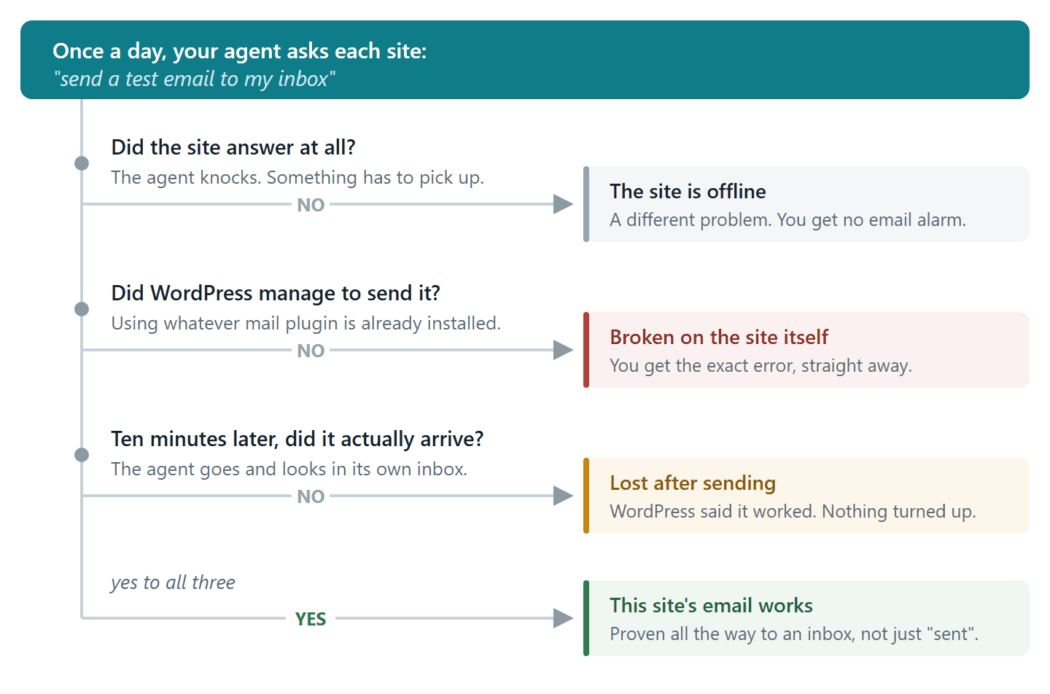
Once a day, the agent asks each of your sites to send a test email. It then checks its inbox to make sure the message arrived. If one goes missing, you’ll hear which site failed, what happened and where to start looking.
The site uses whichever SMTP plugin is already installed, so the heartbeat follows the same route as a real contact-form notification. The site also reports whether WordPress accepted the send request and, if it didn’t, returns the error.
That gives you three useful answers:
- If the site doesn’t respond, it may simply be offline. Mail Canary reports that separately instead of blaming email.
- If WordPress refuses to send, you get the error right away.
- If WordPress says it sent the message but the heartbeat never arrives, something went wrong after the handoff, the kind of failure WordPress can’t see.
Every heartbeat has a unique ID, so one agent can watch 50 sites and send you a quick morning update. Much nicer than testing 50 contact forms before breakfast.
What Mail Canary can’t access
OpenClaw doesn’t get access to wp-admin. Each site runs a small plugin with one job: send a test email when the agent asks. That’s it.
It doesn’t need your personal inbox either. Give OpenClaw its own email address and it can receive heartbeats and send alerts without going anywhere near your real mail.
What you hear from Mail Canary
Each morning, you get one short email showing which sites are sending normally and which ones need attention.
On a good day, it’s a line you can glance at and forget. The daily message also confirms that Mail Canary itself is still alive. If the digest stops arriving, that’s worth checking too.

When a site fails, the same digest tells you what happened:

This is the type of failure that is not easy to catch, because from inside WordPress everything looked fine. Mail Canary also catches wp_mail() errors and reports those within seconds.
Once you’ve fixed the problem, ask for another check. You’ll get confirmation in under a minute instead of waiting for the next scheduled run.
Want the full picture now? Run /mail-canary status at any time.
How to get it set up
Allow around five minutes to set up the agent, then roughly 30 seconds for each WordPress site you add.
Follow the step by step setup guide here
Take it and make it better
The WordPress plugin and OpenClaw skill are both on GitHub. They’re free, so grab them, change them and make them yours.
The same idea can go well beyond email. An agent could walk through a WooCommerce checkout on a staging site, submit a contact form like a visitor or complete a test booking. Now you’re checking whether someone can actually buy, inquire or book, not simply whether the site is online.
Use Mail Canary as it is, or point OpenClaw at the code and ask how it works. Then add the checks that matter to you. That’s half the fun of running your own agent.
It’s a small experiment, but it deals with a very real problem. And, unlike the traditional practice of coal miners using birds to warn themselves about carbon monoxide poisoning, no actual canaries were harmed in the making of this tool!

All the good WordPress stuff, once a month
Subscribe
Create your free account to post your comment
Login to post your comment